The Studio at a glance
Find your way around the Studio: the library, the drawing board, the timeline and the inspector.
Open the Studio from Studio in the site menu. It runs in your browser; there’s nothing to install.
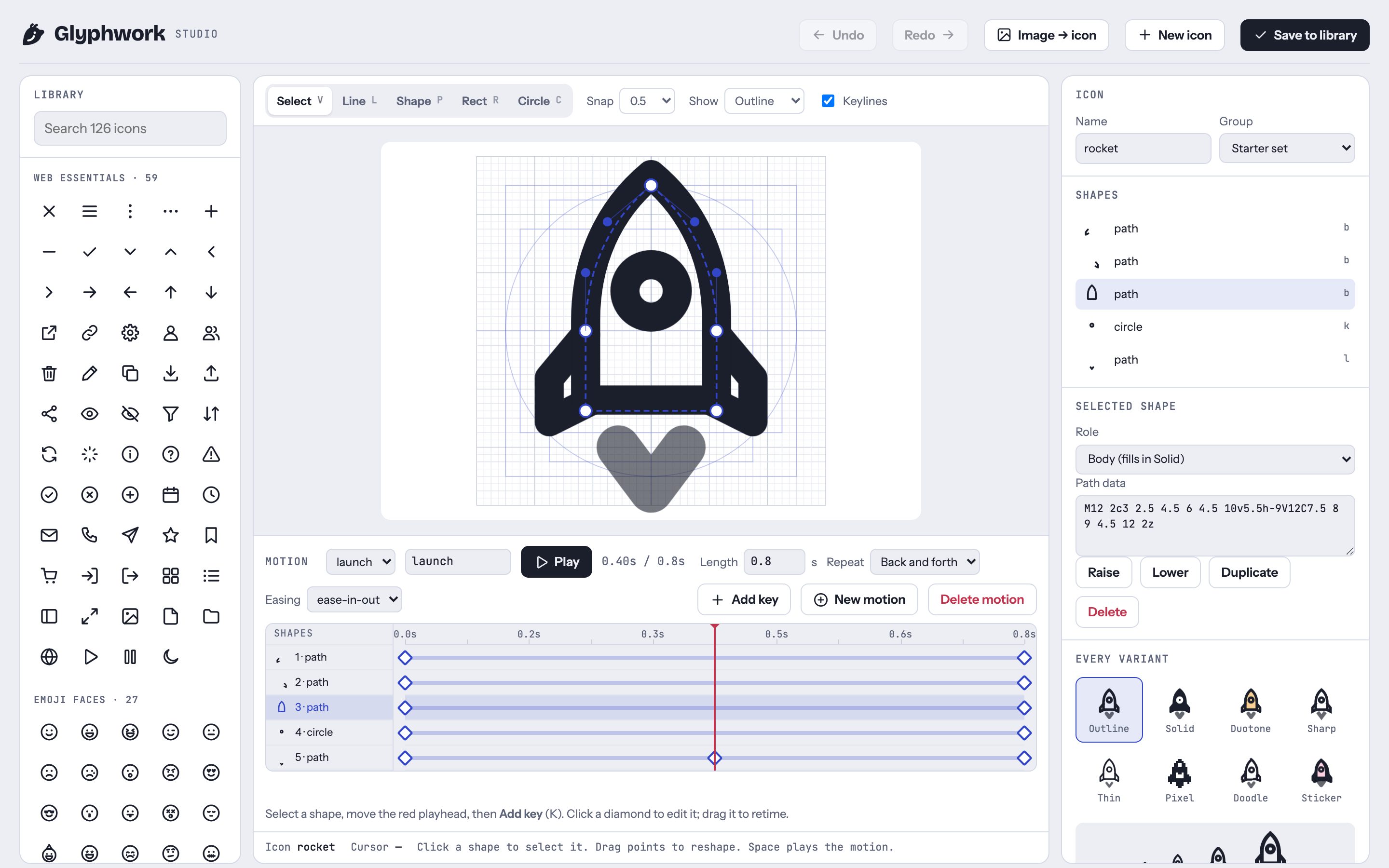
- Library (left): every icon, grouped into Web essentials, Emoji faces, Reactions and Starter set, plus a Custom group for icons you save. Type in Search 126 icons to filter, and click an icon to open it on the board.
- Board (middle): the icon drawn on a 24 × 24 grid. The toolbar above it holds the drawing tools, Snap, Show and Keylines.
- Timeline (below the board): animate the icon. See Animate with the timeline.
- Inspector (right): the icon’s Name and Group, its Shapes, the Selected shape, a preview in Every variant, and Export.
Across the top: Undo, Redo, Image → icon, New icon and Save to library.
The bar along the bottom of the board shows the icon’s name, the cursor position in grid units, and a hint for what to do next.
Open an icon straight from a link by adding its name after
#, like /studio#bell.